This guide explains how to adjust your thermostatic mixing valve (TMV). Adjusting the TMV will change the temperature of the water that reaches your taps (faucet, showers, etc).
Notes
If the water in the tank is below the mixing valve temperature, the mixing valve will not regulate. If you plan to increase the temperature of the mixing valve, you must increase the tank storage temperature.
Reservoir has a hot water alert set at 130F. If you set your mixing valve above this temperature you will get a warning message. You can adjust the warning temperature.
Warnings
Be careful increasing the mixing valve temperatures. High temperatures can lead to scalding.
Tools Needed
- [Optional] Sharpie
- Screw Driver or Wrench
Adjustment Process
Step 1. Record the current mixing valve output temperature (water in the tank must be hot)
Run the hot water at your faucet for 1 minute
While faucet is running, navigate to advanced diagnostics on your device and record the “System Outlet” temperature. This is your current mixing valve temperature.
settings → ”advanced settings→” → > → > → > → > → ”run” advanced diagnostics → ”next →” → ”next →” → read "system outlet”
Step 2. Remove the Reservoir front service panel
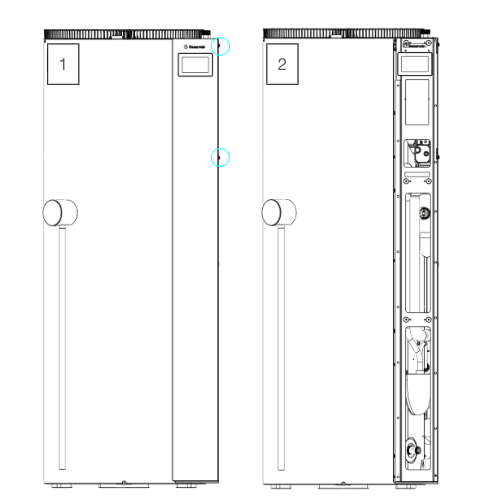
Step 3. Locate the thermostatic mixing valve (TMV) and remove the cap
The TMV has a red cap which can be removed by applying force with your hand or wrench, or with a flathead screw driver in the tab at the base of the cap.
[Optional] Use a sharpie to mark the current position of your mixing valve.
Step 4. Use the keyway on the back of the cap as a tool to adjust the temperature
Note: We recommend you mark the mixing valve to easily identify your starting point
- Decrease temperature (colder water): Turn clockwise
- Increase temperature (hotter water): Turn counterclockwise
Each quarter turn adjusts the temperature between 3-4 degrees Fahrenheit.
For example if you want to adjust your temperature 10 degrees, we would recommend turning the spindle three quarters of a turn.
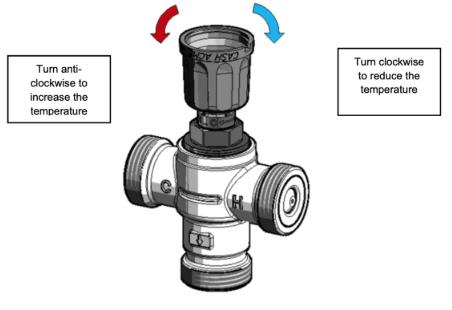
Step 5. Record the updated mixing valve output temperature by following step 1
Step 6. Repeat steps 4 & 5 until you have reached the desired temperature.
Note: You can watch the temperature change live as you adjust the mixing valve. Make sure the temperature is stable (~1 min of flow) before finalizing the setting.
Step 7. Replace the TMV cap and re-install the Reservoir Access Panel.